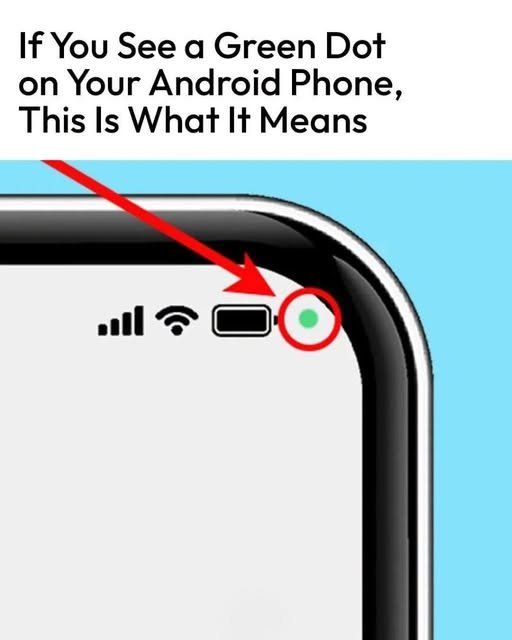
What Does the Green Dot on Your Android Phone Mean?
If you’ve ever noticed a small green dot in the upper-right corner of your Android phone, you may have wondered whether something is wrong or whether an app is secretly using your phone.
Fortunately, the green dot is generally a privacy indicator.
🟢 What Does the Green Dot Mean?
On many modern Android phones, a green indicator appears when an app is actively using your phone’s camera or microphone.
For example, the indicator may appear when you:
📷 Open the camera
🎥 Make a video call
🎙️ Record audio
📞 Use an app that requires microphone access
📱 Use an app that needs camera access
The exact appearance and behavior can vary depending on your Android version and phone manufacturer.
🔐 Why Did Android Add This Feature?
The green indicator is designed to make it easier for users to understand when sensitive hardware is being accessed.
Instead of an app using your camera or microphone without you noticing, Android provides a visible notification on the screen.
This gives you a quick way to check whether an app is currently accessing these permissions.
👆 How Can You Find Out Which App Is Using the Camera or Microphone?
If you see the green indicator and don’t know why it’s there, try pulling down your Quick Settings/notification panel.
On supported Android versions, tapping the privacy indicator can provide more information about which app or service is accessing the camera or microphone.
You can then check whether the access makes sense.
⚙️ Check Your Camera and Microphone Permissions
You can also review which apps have permission to use these features.
Go to:
Settings → Privacy → Permission Manager → Camera
Then review the applications that have camera access.
The exact menu names may differ slightly depending on your Android phone.
🚨 What If the Green Dot Appears Unexpectedly?
Don’t automatically assume that your phone has been hacked.
First, check which application recently used the camera or microphone.
If an app has permission that you don’t think it needs, you can remove that permission from your phone’s settings.
You should also keep your Android system and apps updated and uninstall applications you no longer use or don’t recognize.
📱 Does the Green Dot Mean Someone Is Watching You?
Not by itself.
The indicator means that an app or service is accessing the camera or microphone—it does not automatically mean someone is remotely watching or listening to you.
The important thing is to identify which app is using the permission.
Final Thoughts
That little green dot is actually a useful privacy feature, not necessarily something to worry about.
The next time you see it, check which app is accessing your camera or microphone. If the access is expected, there’s usually nothing to worry about.
If it appears unexpectedly, reviewing your app permissions is a good first step. 🔒📱
Have you ever noticed the green dot on your Android phone? Did you know what it meant? 👇
To provide the best experiences, we use technologies like cookies to store and/or access device information. Consenting to these technologies will allow us to process data such as browsing behavior or unique IDs on this site. Not consenting or withdrawing consent, may adversely affect certain features and functions.
Functional
Always active
The technical storage or access is strictly necessary for the legitimate purpose of enabling the use of a specific service explicitly requested by the subscriber or user, or for the sole purpose of carrying out the transmission of a communication over an electronic communications network.
Preferences
The technical storage or access is necessary for the legitimate purpose of storing preferences that are not requested by the subscriber or user.
Statistics
The technical storage or access that is used exclusively for statistical purposes.The technical storage or access that is used exclusively for anonymous statistical purposes. Without a subpoena, voluntary compliance on the part of your Internet Service Provider, or additional records from a third party, information stored or retrieved for this purpose alone cannot usually be used to identify you.
Marketing
The technical storage or access is required to create user profiles to send advertising, or to track the user on a website or across several websites for similar marketing purposes.